
Loupa
A lightweight Chrome extension that surfaces the details LinkedIn buries — and lets you sort and filter results without leaving the page.
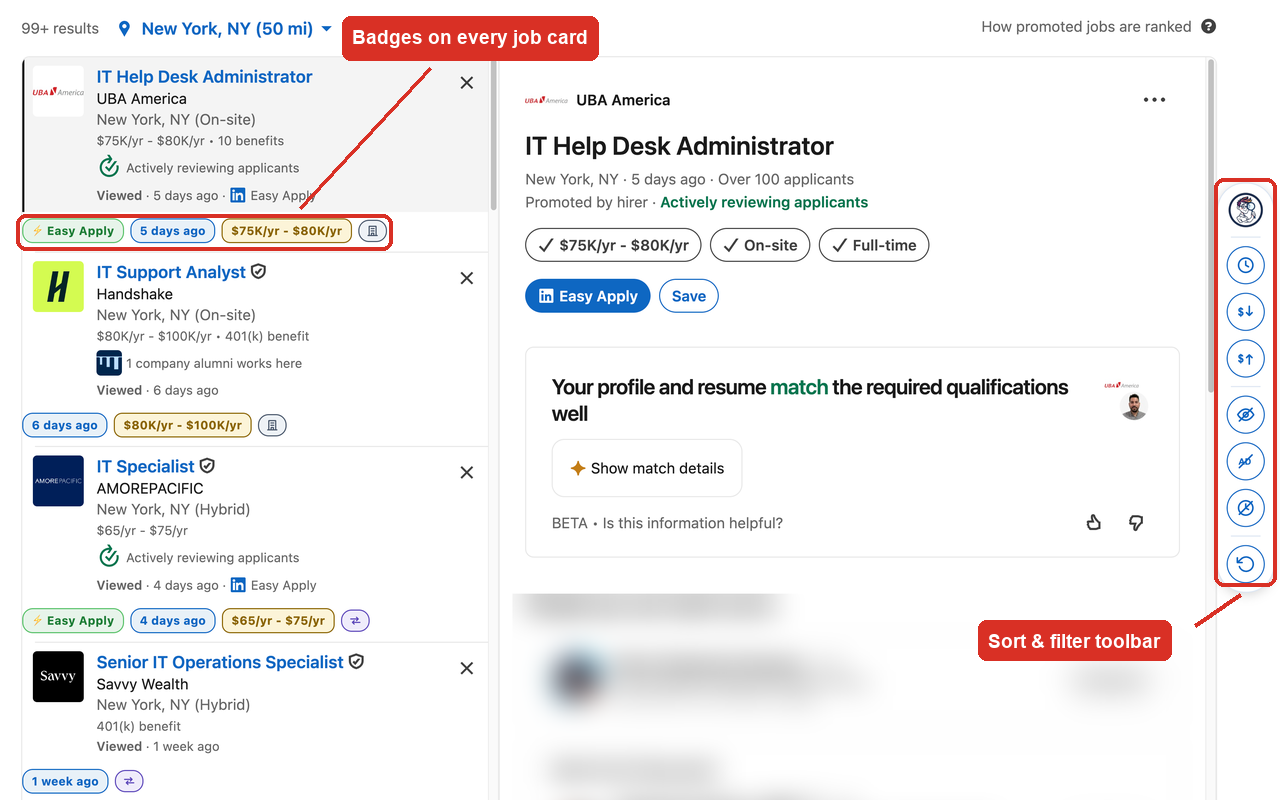
Loupa adds compact badges to every job card and a floating toolbar for sorting and filtering. Everything runs locally in your browser: no accounts, no tracking, no data ever leaves your machine.
Install Loupa from the Chrome Web Store →
What it does
Badges on every job card
- Posted date — spot stale listings at a glance, or see No date when LinkedIn hides it
- Salary — in a consistent format (
$95K/yr,$45/hr,$4,000/mo), or No salary when the listing doesn’t give one - Workplace type — Remote, Hybrid, or On-site, as a clear icon
- Easy Apply — highlighted so quick-apply roles stand out
A sort and filter toolbar
A floating rail sits at the edge of the page:
| Control | What it does |
|---|---|
| 🕐 Latest first | Newest postings on top; undated ones sink to the bottom |
| 💲↓ / 💲↑ | Sort by salary, high to low or low to high |
| 👁 Unviewed first | Push jobs you’ve already opened to the bottom |
| 🅰 Hide promoted | Remove sponsored listings entirely |
| 🕐 Hide undated | Hide listings with no posting date |
| ↻ Reset | Back to LinkedIn’s original order |
Sorts and filters combine — so you can line up exactly what you want to see, such as unviewed jobs only, promoted listings hidden, highest paying first.
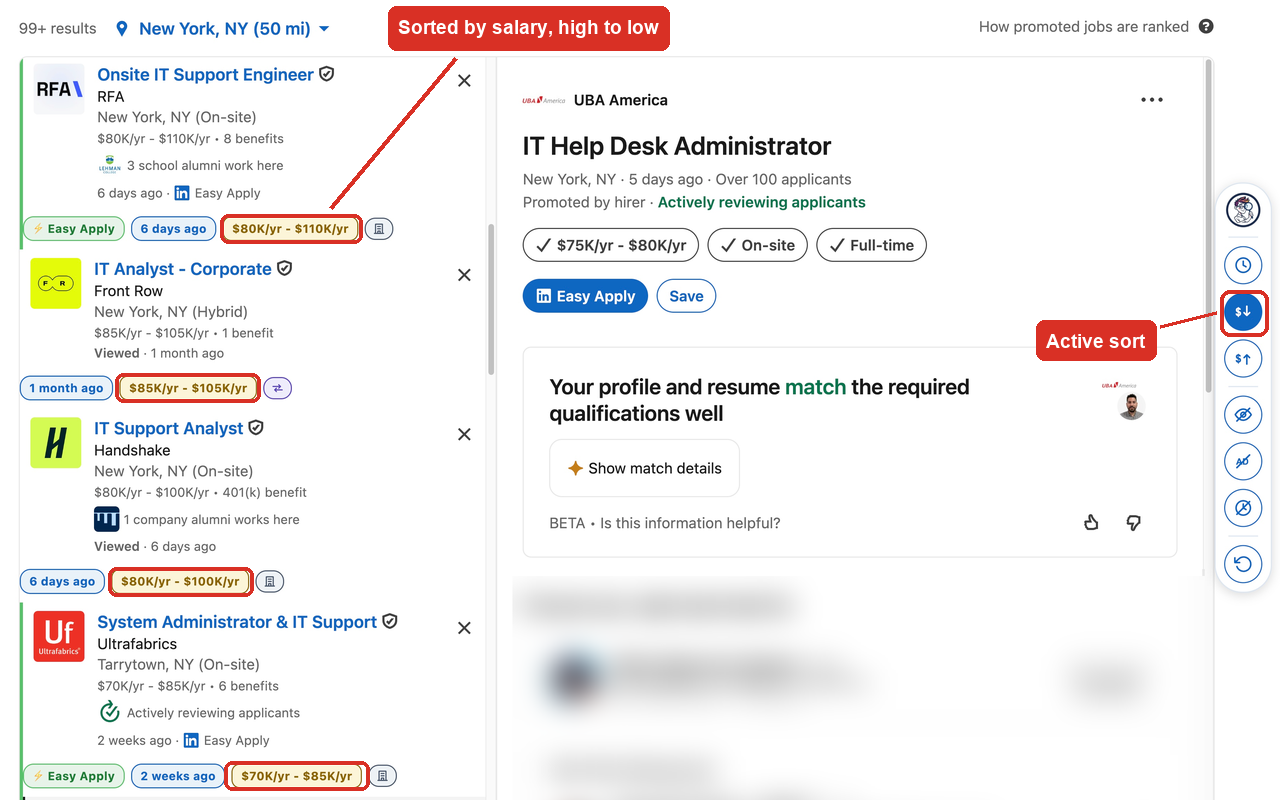
Salary sorting normalizes pay periods (hourly ≈ 2,080 hrs/yr, monthly × 12) and compares the top of each range, so an hourly rate is ranked fairly against an annual salary.
What’s new
1.19.0 — August 2026
- A split toolbar. The rail used to stack every button in one vertical column — sort, filter, reset — with only a hair-thin divider between them, and picking the right one meant reading each icon. The rail now shows two clear groups: sort on top, filter below, with a real gap between them and reset off on its own. It’s a glance, not a hunt.
- Automatic theming. Loupa reads whatever theme LinkedIn is showing and matches it. In dark mode the badges and toolbar switch to darker fills with matched-contrast text instead of glowing white over a dark page.
- Higher-contrast support. If your system is set to
prefers-contrast: more, Loupa honours it — thicker borders, deeper colours, no faint greys on grey. One badge combination that had been failing WCAG contrast on light backgrounds is also fixed.
1.18.0 — August 2026
- Salaries in GBP and CAD. Loupa only recognised US dollars, so a London or Toronto
listing showed no salary badge at all — and after 1.17.0, it was labelled No salary
on a card that plainly showed one. Both forms are now read:
£36,000/yrand the code form LinkedIn uses abroad,36K GBP/yrand85K CAD/yr - 110K CAD/yr. - Honest sorting across currencies. Comparing £36K against $95K would need a live exchange rate, and fetching one would mean sending a request — which Loupa doesn’t do. So on the rare page that mixes currencies, listings are grouped by currency and sorted by amount within each group. Nothing is ranked against a currency it can’t fairly be compared to.
- No more false No salary. A listing priced in a currency Loupa doesn’t read yet now shows nothing rather than claiming there’s no salary.
1.17.0 — August 2026
- A “No salary” badge. Most LinkedIn listings don’t post a salary, and until now an empty space could mean either “not listed” or “Loupa missed it”. Cards without a salary now say so outright, in the same muted grey as No date.
- Consistent pay periods. Listings mix
$4,000/mo,$4,000 a monthand$4,000 per monthon the same results page. Every salary badge now reads the same compact way —$95K/yr,$45/hr,$4,000/mo— so figures are comparable as you scan rather than needing conversion in your head.
1.16.0 — August 2026
- First public release on the Chrome Web Store: badges for posted date, salary, workplace type and Easy Apply, plus the sort-and-filter rail.
You can check your installed version at chrome://extensions. Chrome updates
extensions automatically, usually within a few hours of a release going live.
How it works
Loupa is visual-only and non-destructive. Sorting reorders cards on screen using the
CSS order property rather than moving anything in the page, so LinkedIn’s infinite
scroll and its own behavior keep working exactly as before. Nothing is deleted, saved,
or sent anywhere.
Job cards are found via stable anchors rather than LinkedIn’s frequently-changing CSS class names, which keeps it working across their UI updates.
Privacy
Loupa collects nothing. No analytics, no tracking, no cookies, no accounts, and no network requests of its own. All processing happens locally in your browser.
Read the full privacy policy →
Support
Having trouble, or spotted a job board layout Loupa doesn’t handle?
Please use the Support tab on the Chrome Web Store listing to report it. Including a screenshot and the search page you were on makes issues much faster to fix.
Common things to check first:
- Loupa runs on LinkedIn job pages (
linkedin.com/jobs/…). It won’t appear elsewhere. - If badges stop appearing after a LinkedIn redesign, reload the page first — the extension re-scans automatically as new cards load.
- The toolbar appears once real job cards are on the page, so it won’t show on an empty or still-loading search.
Not affiliated with, endorsed by, or sponsored by LinkedIn. LinkedIn is a trademark of LinkedIn Corporation.